

If you are a senior RPG developer, you have probably been asked to review code you did not write for most of your career. Reviewing code an AI agent wrote is a different job.
A human colleague's mistakes tend to be visible. A missing semicolon, a field nobody declared, a loop that obviously never ends. AI-generated code fails differently. It usually looks clean, compiles without complaint, and reads like something a careful developer would write. When it is wrong, it is often wrong in ways that only someone who knows the application would catch.
Developers broadly have figured this out. In Stack Overflow's 2026 Developer Survey (opens in a new tab), the most common answer to how much developers trust AI output was that they trust it when they can easily verify it, chosen by 48% of respondents. Only 6.6% said they trust it for important work decisions.
For IBM i teams, verification carries extra weight. The applications in question run invoicing, order processing, and overnight batch work. A change that looks right and behaves slightly differently is not a style problem. It is a business problem.
This checklist is for the developers doing that verification. It focuses on what to look for in AI-generated RPG specifically, beyond the general advice that applies to any language.
Start With What Has Already Been Checked
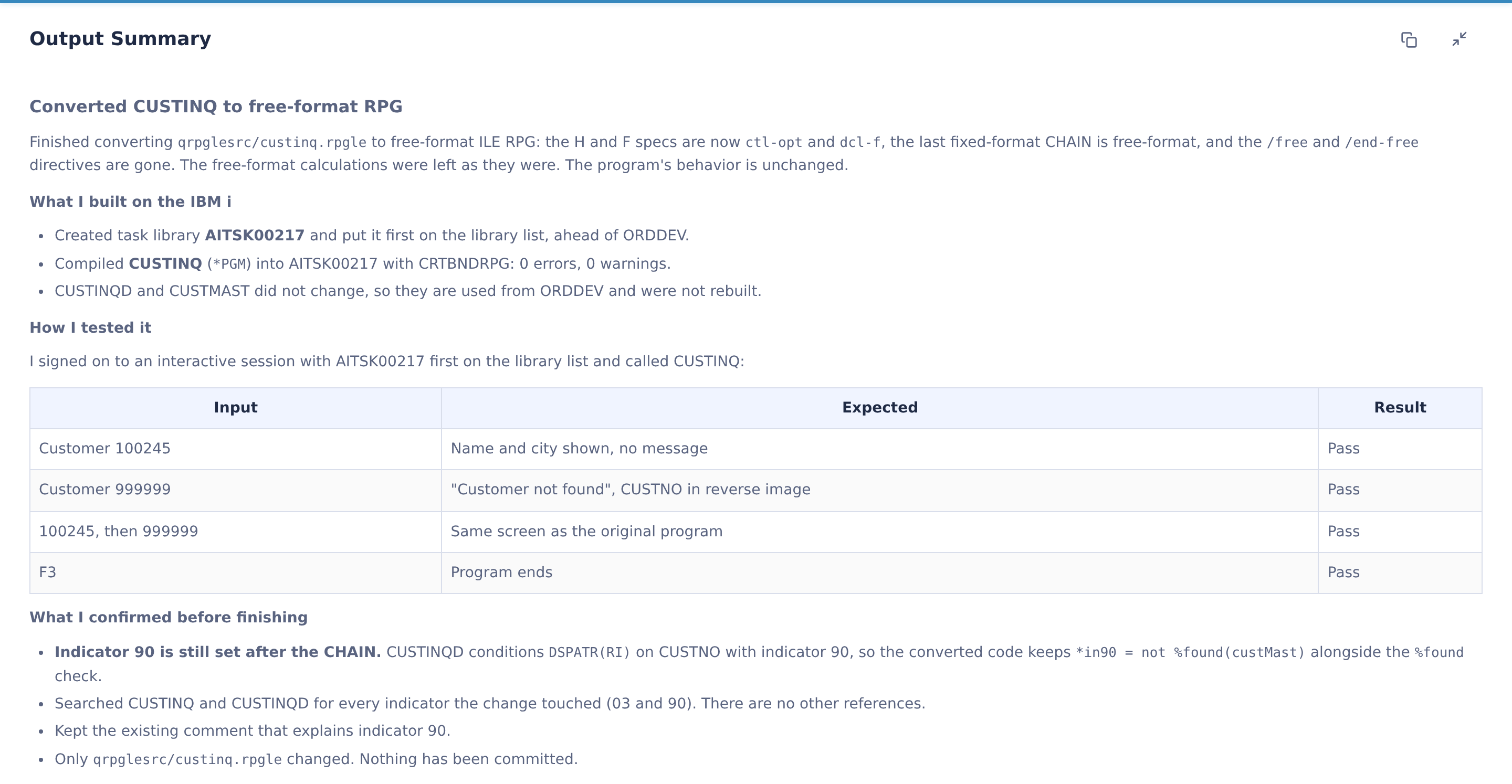
Before reviewing anything, know what kind of output you are looking at. A code suggestion pasted from a chat window has been checked by no one. A result from an agentic platform like CoderFlow has already been compiled against your real IBM i environment and tested against acceptance criteria before it reaches you.
That difference changes where your attention should go. You do not need to spend review time confirming that the code compiles or that the obvious happy path works. Your job is the part that compile and test checks cannot fully cover: whether the change preserves what the program is supposed to do for the business.
Start every review by reading what the agent reports it did. Which objects did it change? How did it test the result? What did it confirm before finishing? That summary tells you where to look harder.
The Checklist
1. Indicators That Disappeared
Fixed-format RPG leans heavily on indicators, and conversion to free-format is where they most often go missing.
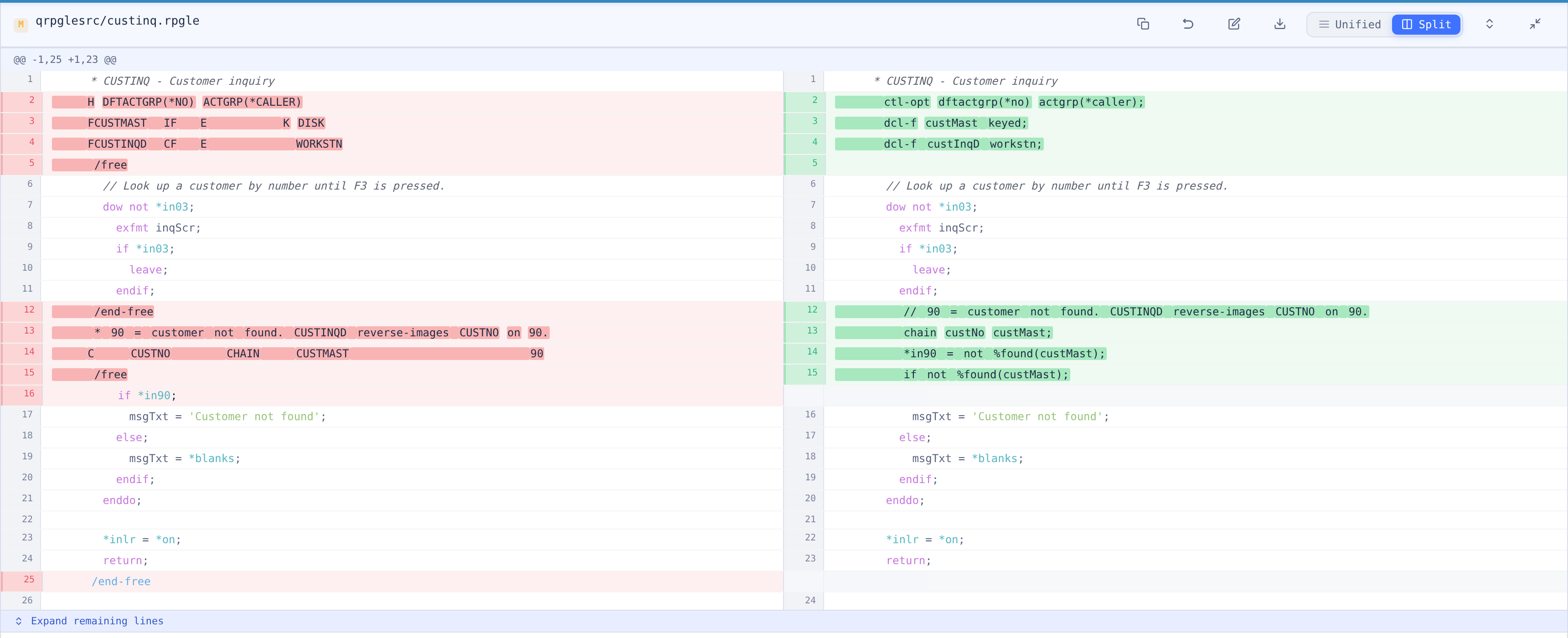
Consider a fixed-format CHAIN with a resulting indicator in the not-found position:
C CUSTNO CHAIN CUSTMAST 90
C IF *IN90 = *ON
A clean free-format conversion replaces the indicator with a built-in function:
chain custNo custMast;
if not %found(custMast);
That conversion is correct for this block. The question is whether *IN90 is used anywhere else. If later logic, a subroutine, or the display file still references indicator 90, the converted code no longer sets it, and that logic now runs on whatever value the indicator happened to hold. Search the full program and its display file for every indicator the change touched.
2. MOVE and MOVEL Semantics
MOVE and MOVEL do not behave like EVAL, and a conversion that treats them as equivalent can change data quietly.
When MOVE copies a shorter character value into a longer field, it replaces only the rightmost positions and leaves the leftmost characters of the target unchanged. EVAL replaces the entire target and pads with blanks. Code that depended on MOVE preserving part of a field will behave differently after a straight conversion to EVAL, and nothing about the new code will look wrong.
Check every MOVE and MOVEL the agent converted, and confirm the replacement reproduces the original behavior for the actual lengths and types involved, including numeric-to-character moves.
3. Numeric Precision, Rounding, and Overflow
Packed and zoned decimal fields carry business meaning in their precision. Review how the change handles them.
Look for lost half-adjust. If the original used an operation code with half-adjust, the converted EVAL needs the (H) extender, or results will truncate where they used to round. On invoices and pricing, that difference shows up in pennies, and pennies add up.
Look at overflow behavior too. Fixed-format arithmetic operations can truncate high-order digits silently, while EVAL signals an error when a result does not fit. A conversion can turn a calculation that used to truncate without complaint into one that fails at runtime. Neither is inherently right, but the change in behavior should be a deliberate decision, not a side effect.
4. Dates in Formats Nobody Documented
Many IBM i applications store dates as numbers in formats that predate modern date types: six-digit MMDDYY or YYMMDD values, seven-digit CYYMMDD values with a century digit, or application-specific conventions.
AI agents generally handle native date types well. The risk is in assumptions about legacy numeric dates. Check that any conversion uses the correct format for that specific field, that century handling matches the original logic, and that comparisons between dates still compare the same thing they did before.
5. Data Access That Changed Shape
Refactoring record-level access to SQL is one of the most valuable changes an agent can make, and one of the most important to review carefully.
Confirm the new query selects the same records the old logic processed, including key ranges and the order of processing where it matters. A loop of SETLL and READE has specific boundaries, and the equivalent SQL needs the same ones.
Check not-found and error handling. A CHAIN that sets %FOUND behaves differently from a SELECT INTO that returns SQLCODE 100. Every SQL statement should have its result checked, and the program should respond the same way the original did when no record exists.
Check locking and commitment boundaries. Native file operations and SQL do not necessarily lock records the same way. If the original program relied on a record lock between a read and an update, confirm the new version preserves that protection.
Watch for null-capable columns, which native I/O and SQL can treat differently, and for SQL statements placed inside loops where a single set-based query would perform far better in batch.
6. Error Handling That Got Lost in Translation
Older programs often handle errors through file error indicators, *PSSR subroutines, or conventions that are easy to miss. Newer code may use MONITOR blocks. Check that every error path in the original still exists in the new version and leads to the same outcome: the same message, the same rollback, the same exit.
An agent that restructures a program can remove an error path without breaking compilation or the main test case. Only reading for it will find it.
7. Changes Outside the Scope You Asked For
Read the full diff, not just the part you expected to change.
AI agents sometimes rename variables, reformat untouched code, consolidate data structures, or remove comments while completing a task. Some of these changes are harmless. Some are not. A comment that explained why a strange-looking condition exists is business knowledge, and deleting it makes the next change riskier.
Pay particular attention to anything that crosses program boundaries: copybooks, prototypes, parameter lists, and service program interfaces. A change to a shared definition affects every caller, including programs that were not part of the task.
8. Comments and Documentation That Sound Right
AI agents write fluent comments and documentation. Fluent is not the same as accurate. If the change added comments or generated documentation, check that the description matches what the code actually does, especially around business rules. A confident, wrong comment can mislead the next developer more than no comment at all.
Let the Platform Narrow Your Focus
Reviewing every AI-generated change line by line against this whole list would take as long as writing the change yourself. The goal is to spend review time where judgment matters and let the platform handle the rest.
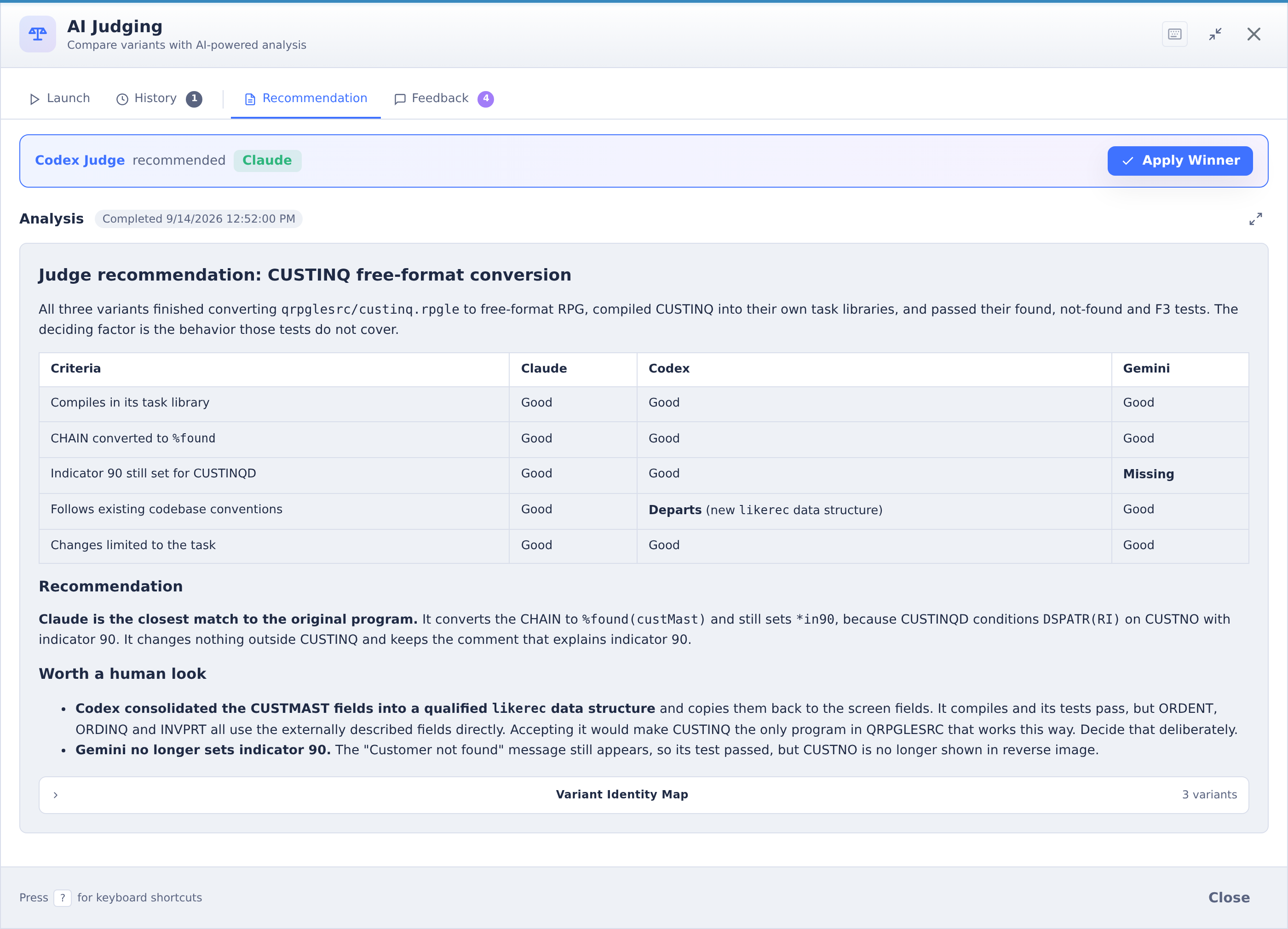
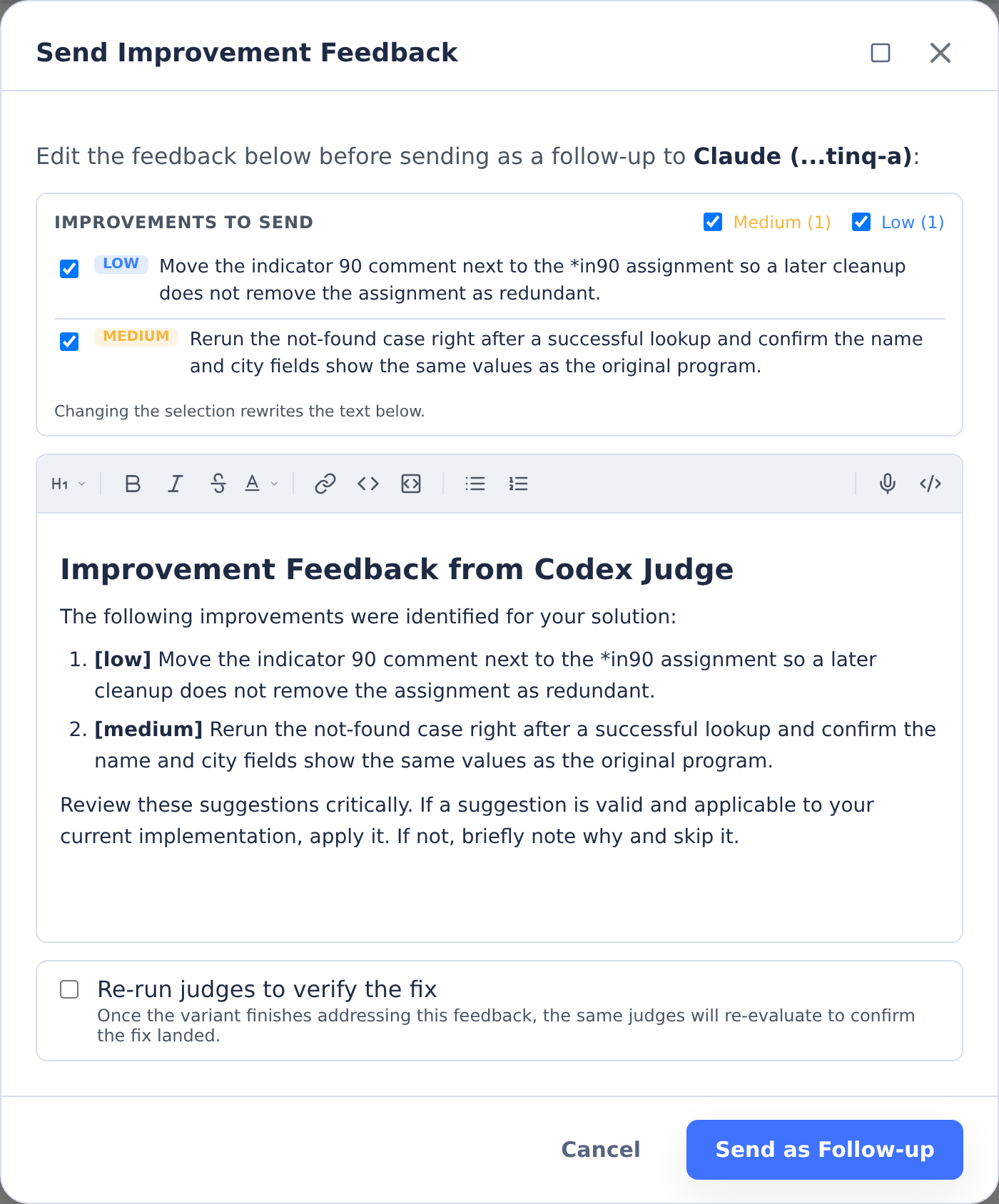
CoderFlow can run the same task across multiple AI models at once, then use judge agents to compare the results on correctness, code quality, and adherence to the task requirements. The judge's reasoning is visible, including the specific strengths and weaknesses it found in each approach and patterns worth a closer look. That gives you a head start: instead of finding every issue yourself, you start from a result that has already been compared against alternatives, with the questionable decisions flagged.
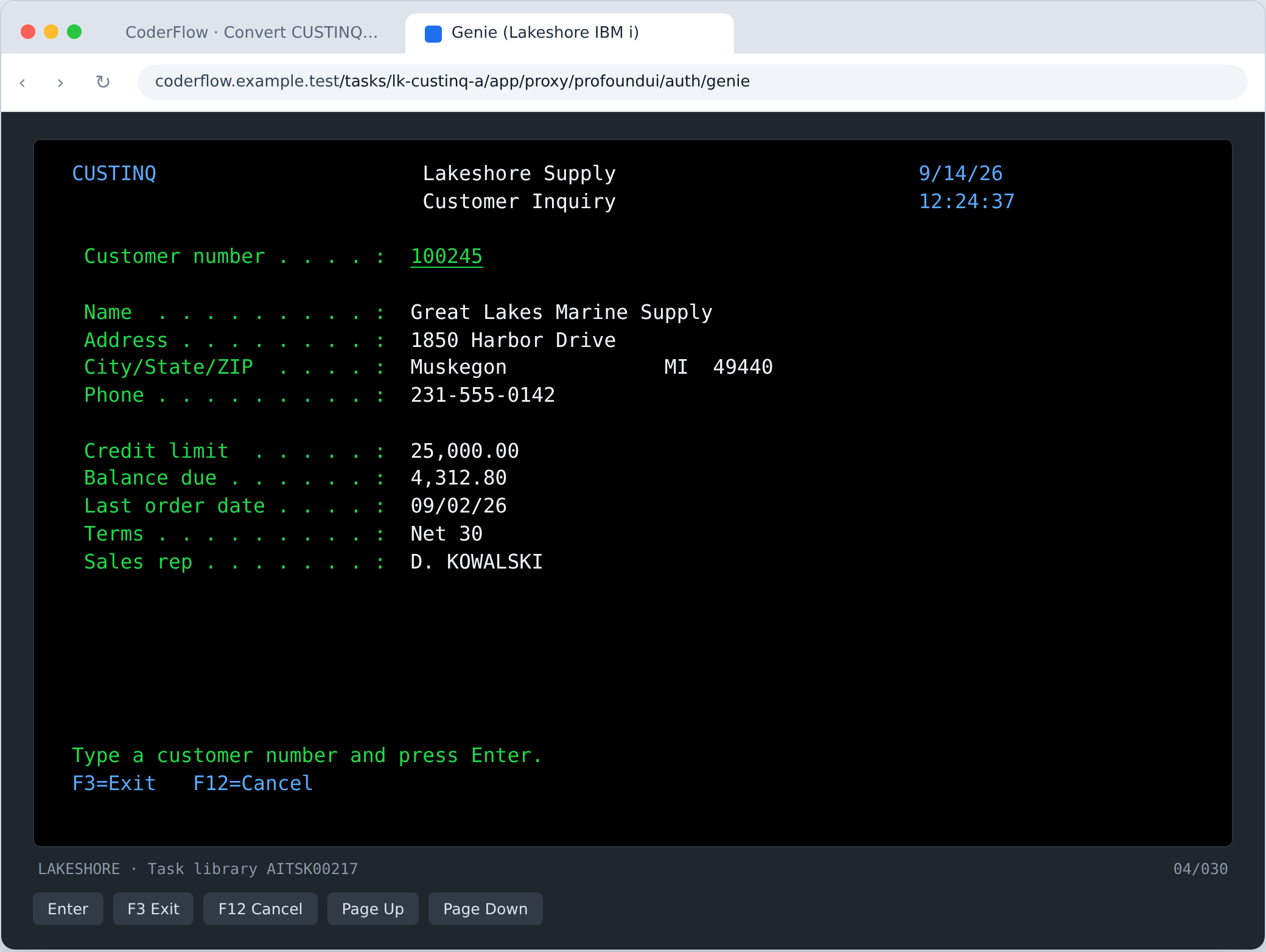
When a change touches a screen, you can verify behavior directly instead of reading code and imagining the result. CoderFlow includes a built-in 5250 emulator that launches from the dashboard, so you can run the changed program, check the screen, and confirm the business behavior before approving anything.
And when you find something, you do not have to fix it by hand. You can comment on the task, flag it for a second reviewer, or send the issue back to an agent as a follow-up task with specific instructions. Nothing is committed until a developer approves it.
Why Your Experience Is the Review
There is a common worry among experienced RPG developers that AI-assisted development makes their knowledge less valuable. This checklist suggests the opposite.
Every item on it depends on knowing the application: which indicators the display file uses, which date fields use which formats, why a strange condition exists, which programs call a shared copybook. Agents can write the code. Recognizing when a correct-looking change is wrong for this business still takes someone who knows how the business runs.
For development managers, that has a practical implication. When agents handle the build, compile, and test cycle, review becomes the constraint on how much work the team can complete. The developers who can review RPG changes well are the ones who determine how fast the team moves, which makes their time worth protecting.
That is also why review skills belong at the center of Futurization™, our trademarked methodology for building new capability on top of proven IBM i applications instead of replacing them. The work moves faster when agents handle execution. It stays safe because experienced developers decide what ships.
See the Review Process on Your Own Code
The best way to evaluate any AI coding platform is to review its output on programs you know well. To see how CoderFlow presents completed tasks, judge analysis, and diffs against your own IBM i code, explore CoderFlow (opens in a new tab) or reach out to Futurization@ProfoundLogic.com to set up a walkthrough.