

Autonomous coding agents that work in parallel, run against your repositories, and hand back reviewable code, all under your team’s existing controls.
Parallel Agents
Reviewable Diffs
Governed Access
Your Repositories
Platform Overview
CoderFlow runs AI coding agents inside isolated containers, against your own repositories, and returns their work as changes you review and approve.
Submit a task in plain language and an agent picks it up, clones the repositories it is entitled to, does the work, runs your build and test pipelines, and hands back a diff. Tasks run headlessly and in parallel, or interactively when you want to guide the work step by step. Everything is managed from a web interface, a command-line tool, or a VS Code extension.
The six screens that follow walk through the whole path: submitting work, reviewing what came back, measuring what it delivered, and administering the platform across a team. Each screenshot is marked with numbered callouts, and the numbered notes beneath it explain what each one is.
The short version: agents do the work in parallel and hand it back as a diff. A person reviews and approves before anything reaches your codebase, exactly the way any other change arrives.
One Board For Every Task In Flight
Agents work in parallel. You watch the whole fleet.
Describe the work in plain language, choose the codebase it belongs to, and CoderFlow launches an agent in an isolated container to carry it out. Every task becomes a card on one board, showing its status, the agent handling it, and how long it has been running.
Work does not queue behind a single assistant. Dozens of tasks progress at once, on whichever agent suits each one, so a team is never blocked and never locked to one vendor.
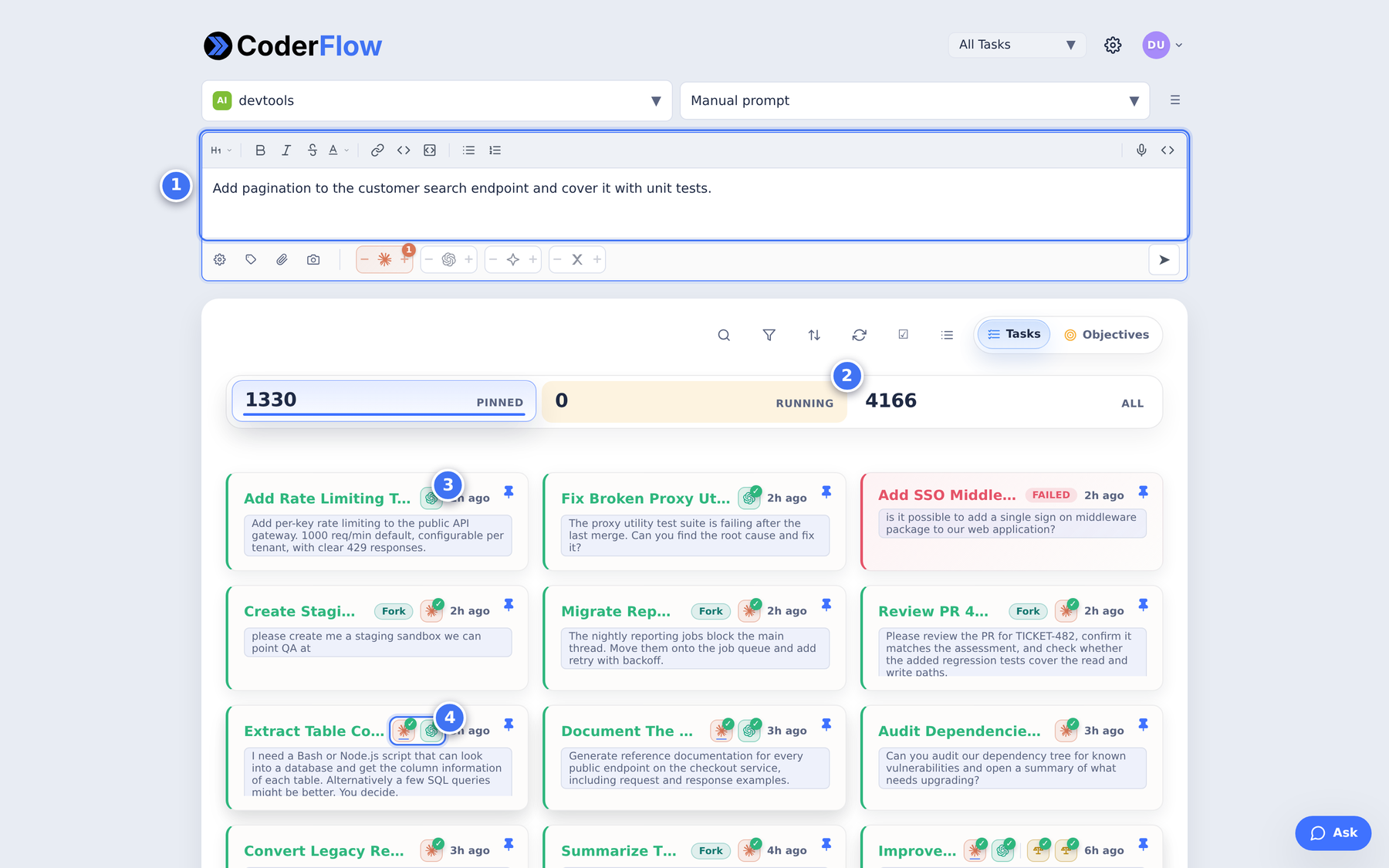
What you are looking at
Type a task the way you would describe it to a colleague, then pick the environment and agent to run it.
This deployment has run thousands of tasks through one server: real, sustained use rather than a demo.
Each card is one task. The badge shows which agent ran it and a green check means it finished successfully.
Nothing Merges Without Approval
The agent does the work. You keep the final say.
When a task finishes it hands back a complete account of itself: the problem it diagnosed, the reasoning behind its fix, and the exact set of files it changed. Diffs are reviewable inline, exactly as you would review a colleague’s pull request.
The example here shows an agent tracing a production error to its root cause, correcting the faulty logic, and adding regression tests. Nothing reaches your codebase until a person approves it.
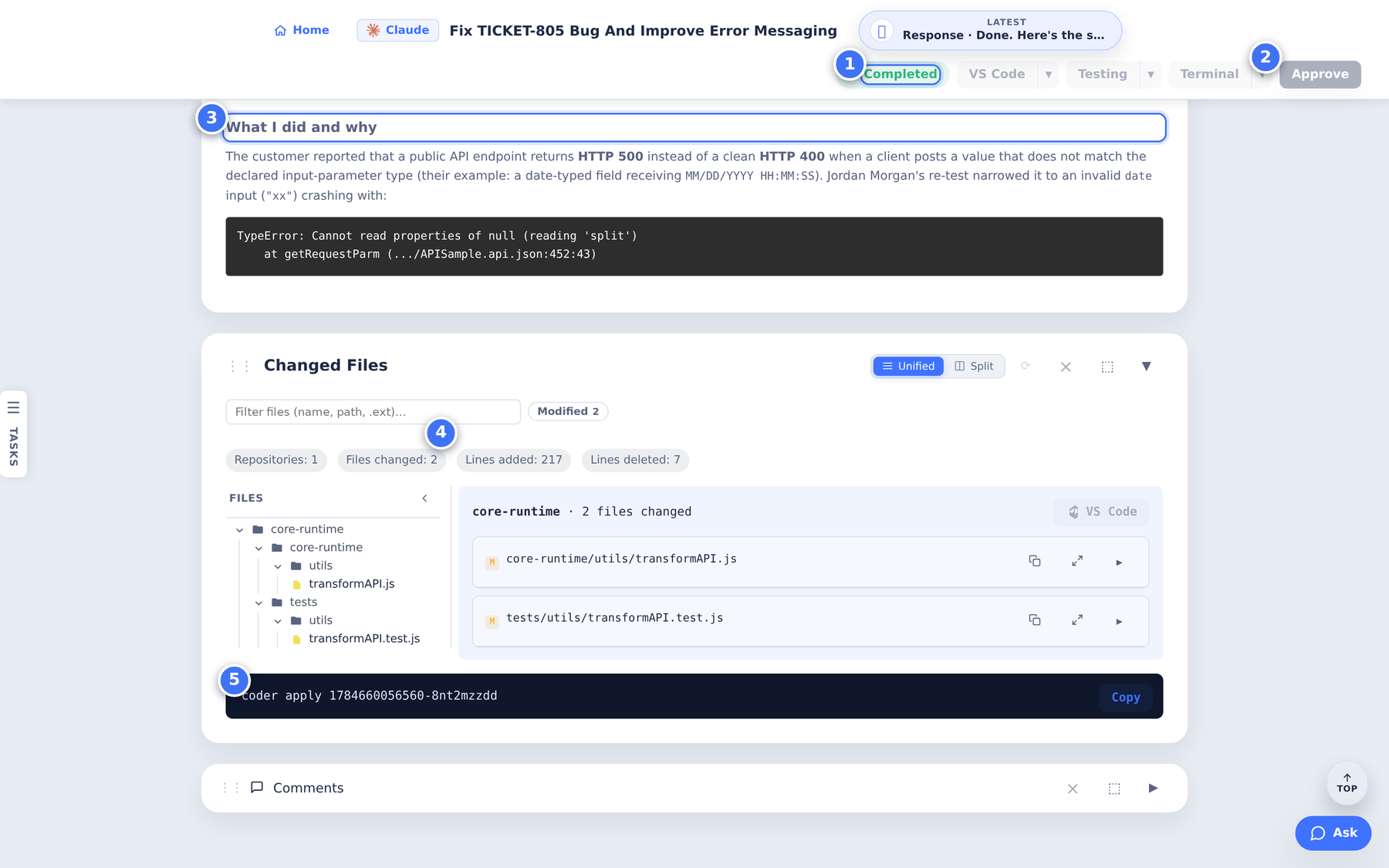
What you are looking at
Measurable Output, Not Promises
Task volume, success rate, and code impact in one place.
CoderFlow records what it delivers. For any period you choose, it reports how many tasks ran, how often they succeeded, and how much code they contributed, broken down by status, task type, environment, and individual operator. Every figure links through to the tasks behind it.
The window shown is a single 30-day month of one production deployment. That is the velocity to keep in mind: this much output, every month.
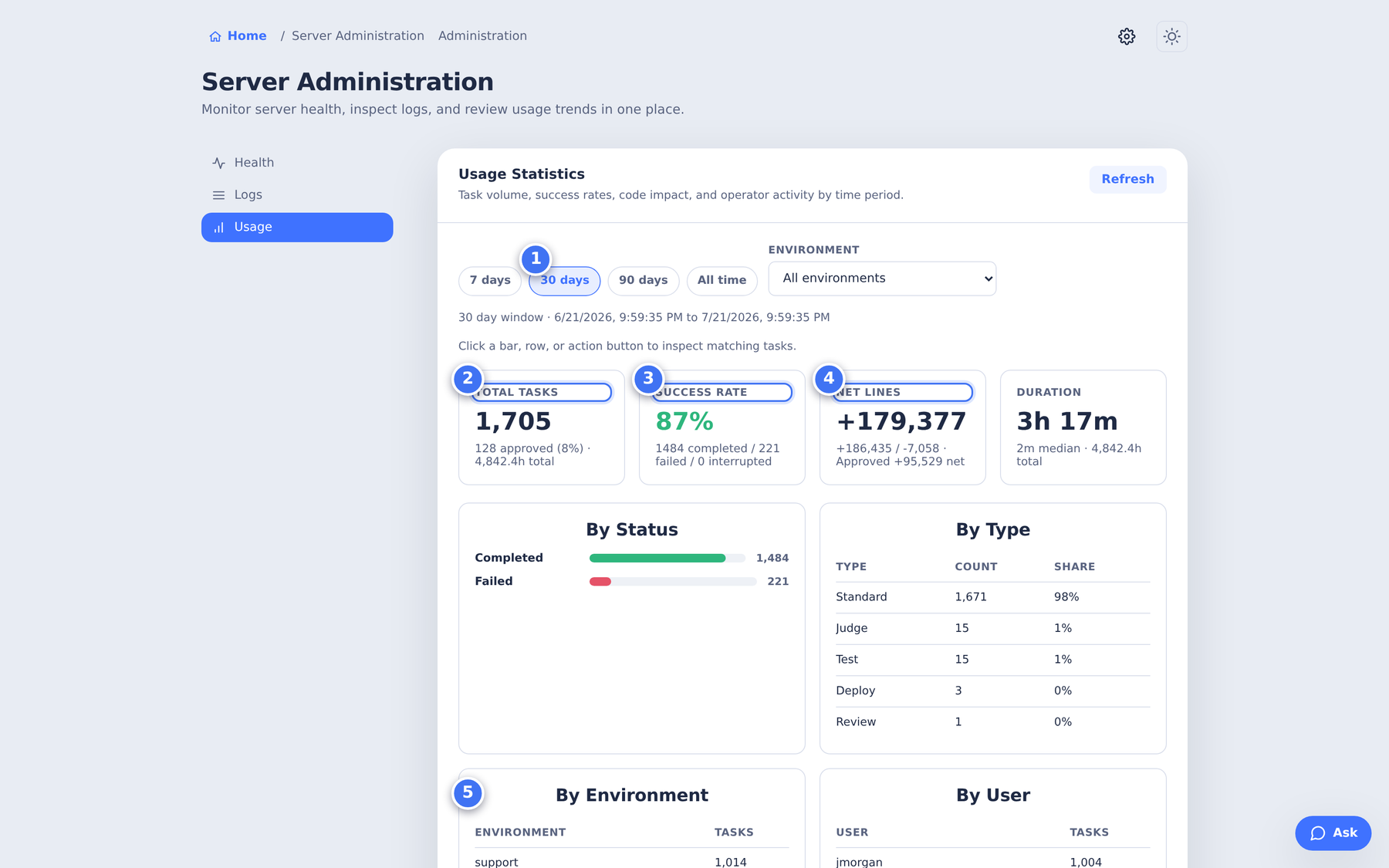
What you are looking at
Configured For Your Stack
Agents inherit your repositories, standards, and tooling.
An agent is only as useful as its context. An environment bundles everything a task needs to be productive from its first second, and each project or team gets its own. A legacy futurization effort and a greenfield service can run on the same server under entirely different rules.
The tabs across the top are where that context lives.
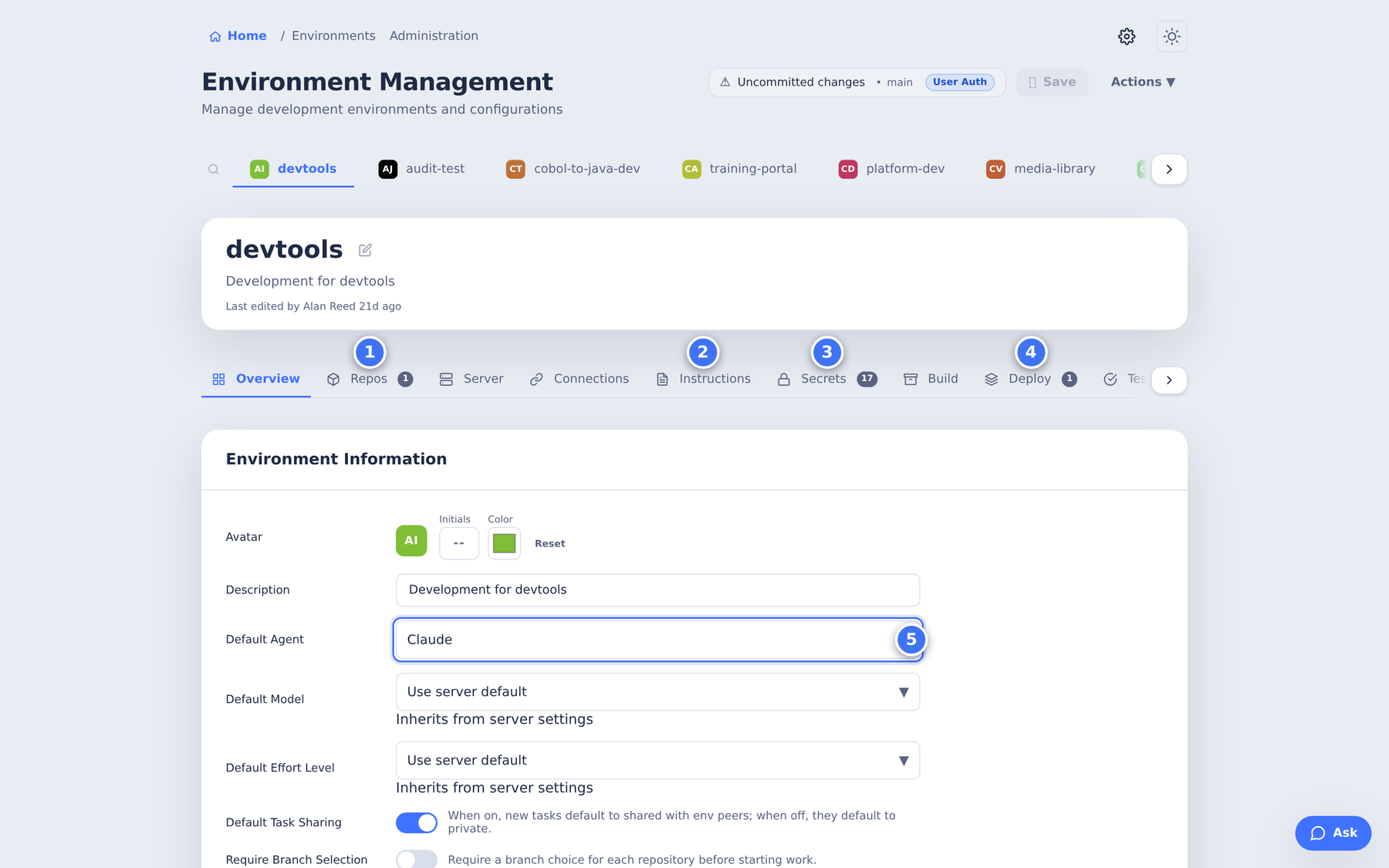
What you are looking at
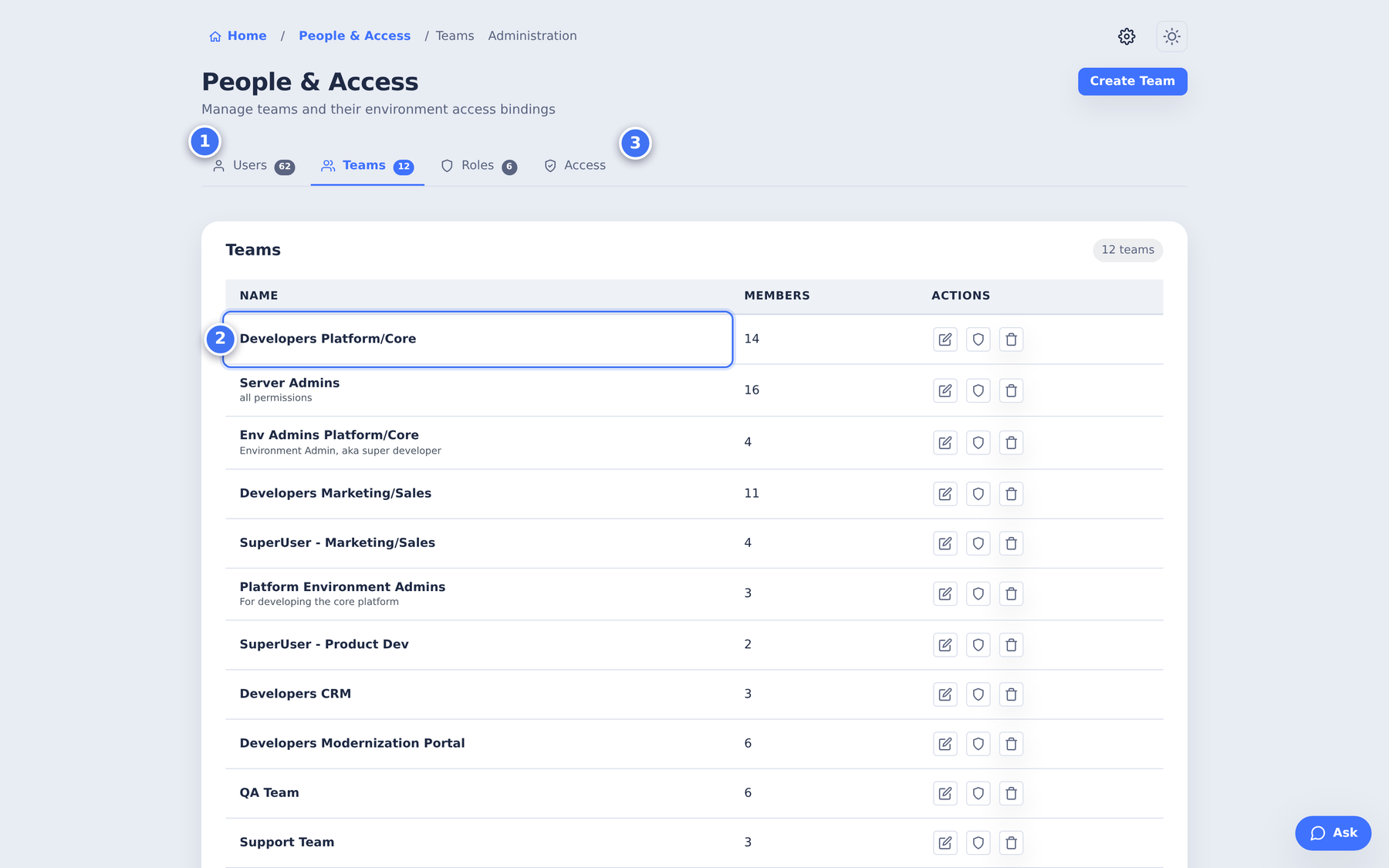
Governed Access From Day One
Users, teams, and roles bound to specific environments.
CoderFlow is built to be deployed across a whole engineering organization, not handed to a single team. Access is managed through users, teams, and roles, and each group is scoped to the environments it is entitled to.
A contractor can be limited to one repository while a platform team holds administrative rights across all of them. Combined with per-environment secrets and container isolation for every task, this is what makes CoderFlow straightforward to put in front of a security review.
What you are looking at
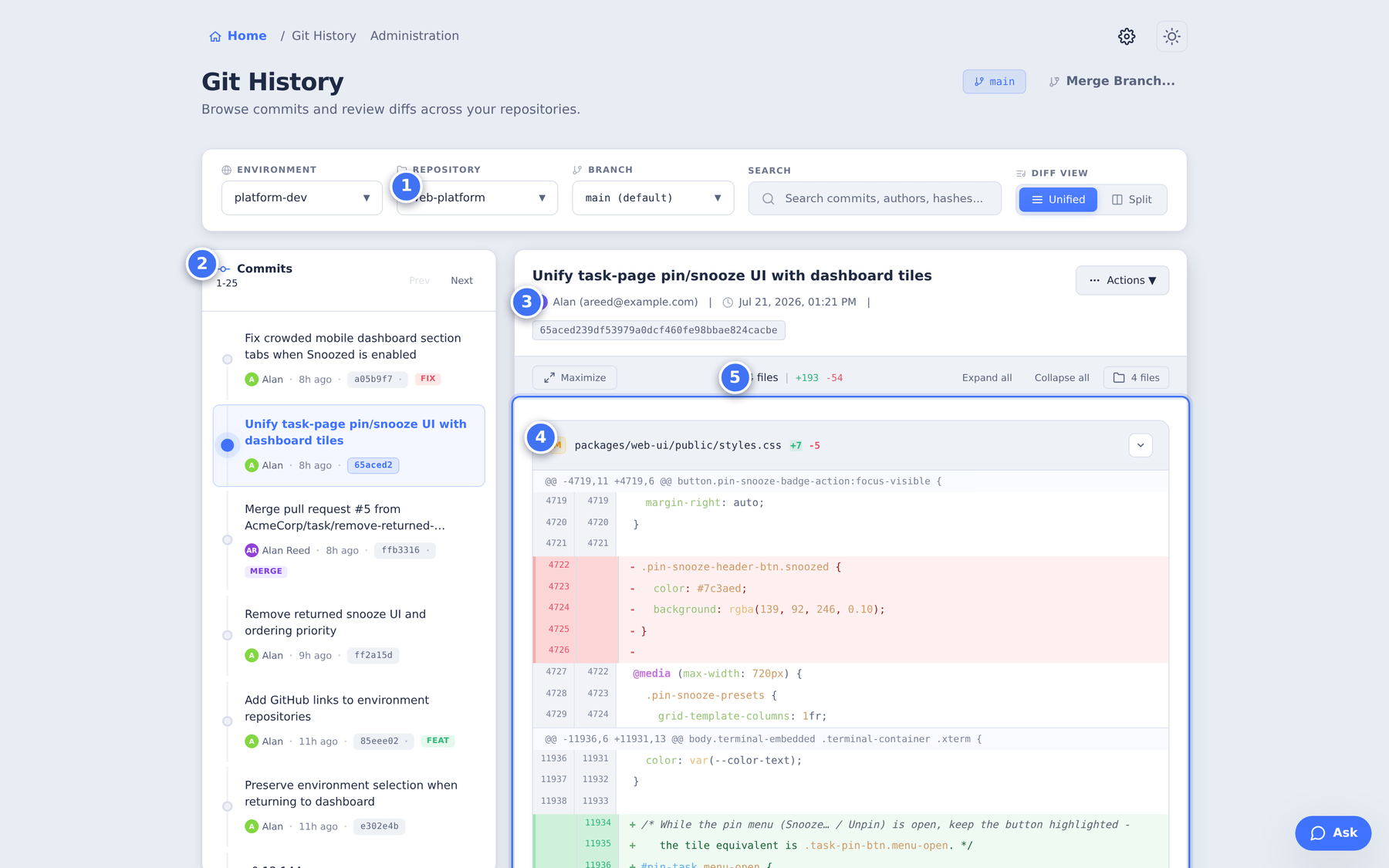
History For Every Repository
Browse commits and review diffs without leaving the platform.
Because CoderFlow already holds the configuration for your repositories, it doubles as a review surface for them. Browse the commit history of any repository and branch, inspect any change in detail, and open a merge as a new task when a change is ready to move forward.
The agents’ own commits appear here alongside everyone else’s, so their work is as visible and auditable as any other contribution.
What you are looking at
Running CoderFlow On Your Own Stack
CoderFlow is a client and server system. The server runs on your infrastructure, holds the configuration and credentials for your repositories, and starts a fresh container for every task. Agents never share state between tasks, and credentials stay on the server rather than inside the containers doing the work.
- Bring your own repositories. Define an environment per project, point it at your Git provider, and describe your conventions once. Every future task inherits them.
- Bring your own agents. Claude, Codex, and Gemini are supported, selectable per environment or per task.
- Keep your existing review process. Work arrives as a diff behind an approval step, so it enters your codebase the same way any other change does.
Screenshots show a working CoderFlow deployment. Project, repository, environment, and user names have been replaced with illustrative equivalents; the interface and the reported figures are unmodified.
CoderFlow, powered by Profound Logic.
Download your CoderFlow Platform Overview
See how CoderFlow runs AI coding agents — Claude, Codex, and Gemini — in parallel against your own repositories, all inside isolated containers with your existing controls intact.