

Descriptions of agentic coding are easy to find. Every vendor has a version of the story: agents take on your work, run autonomously, hand back verified results. The business case sounds compelling.
But there is a question that often goes unanswered: what does this actually look like when you sit down in front of a real IBM i environment and hand something to an agent?
Here are three concrete task types run against a working IBM i environment with real RPG programs, real compilation, and real 5250 testing. No sandbox, no simulation.
Here is what CoderFlow actually does, and what developers see at each stage.
Adding New Functionality to an Existing Program
Start with something developers handle regularly: a request to extend an existing program. In this case, a work-with-customers application that had a display option but no edit option. The requirement was to add option 2=edit, open the customer detail screen in edit mode, allow the user to update the record, and write changes back to the database.
The developer opens the CoderFlow dashboard, which runs in a browser with nothing installed locally, and enters the requirement in plain language. No special syntax, no template required for a task like this. Then they do something that sets CoderFlow apart from a copilot: they launch the task against multiple AI models simultaneously. Claude, Gemini, Codex, and Grok each run in their own isolated Docker container, working the same requirement independently. Judging agents are also configured to evaluate the outputs automatically when the primary agents finish.
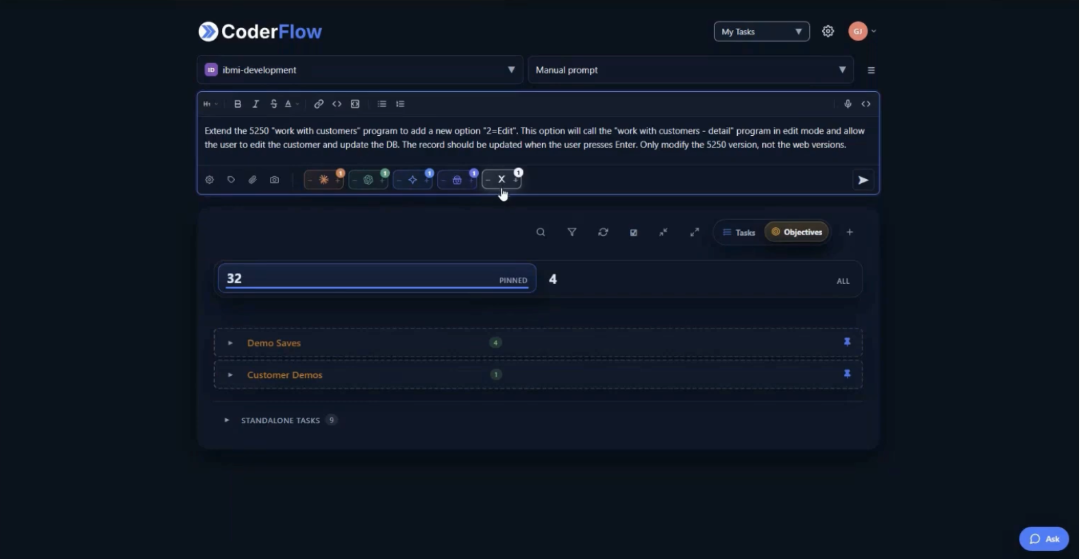
Then the developer moves on to something else. That is the point. Multiple agents are running the full build-test-fix loop in parallel: reading the source, making the change, compiling, fixing any compiler errors, testing against a built-in 5250 emulator, and confirming the requirement is satisfied. None of that requires the developer to be present.
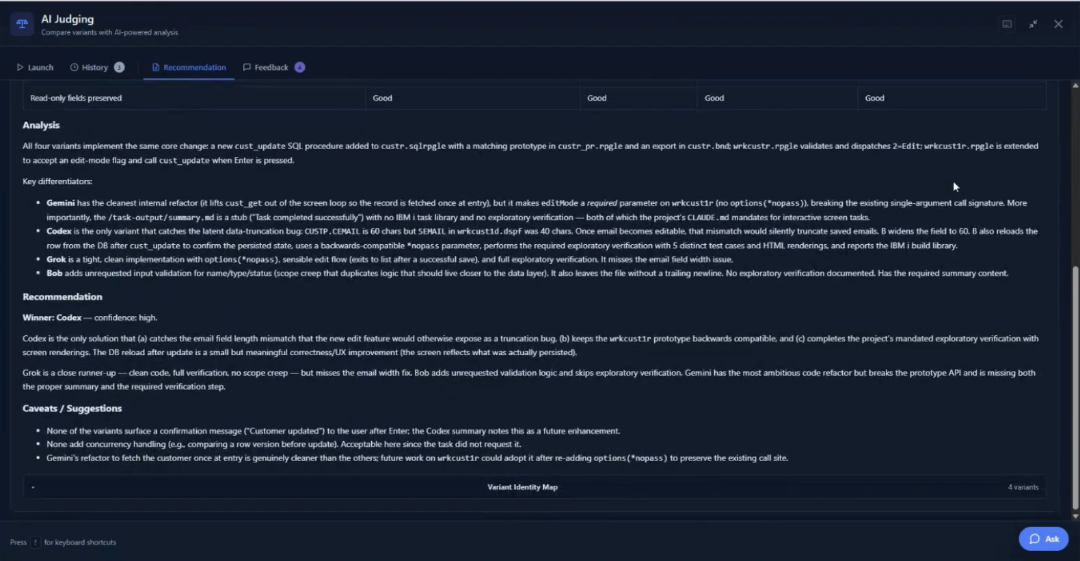
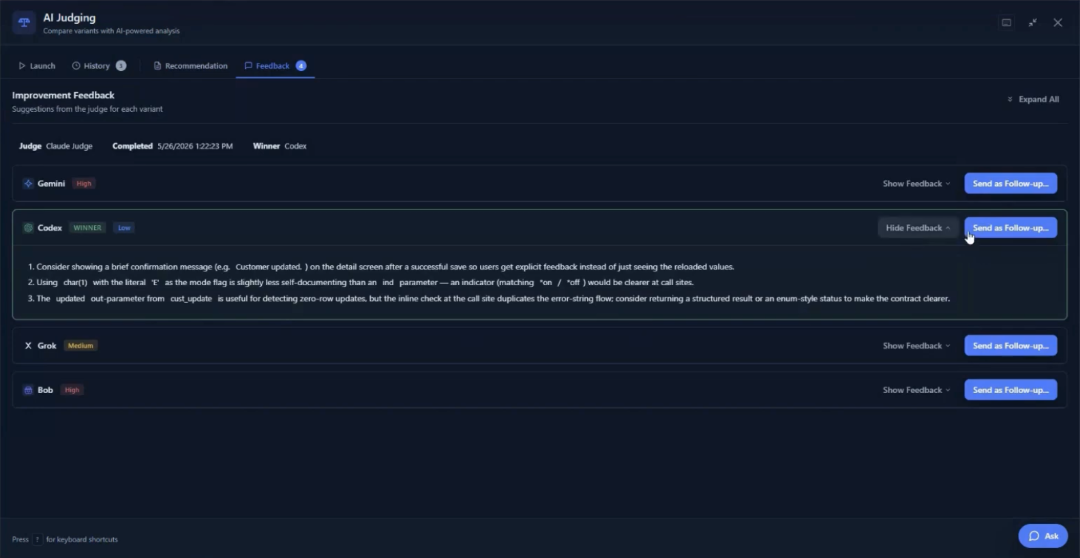
When the results surface, the judging agents have already done the evaluation work. In this case, all three judges independently assessed the same model as producing the strongest result, citing solid core functionality, proper SQL error handling, and a fix for a field truncation issue the other agents had missed. The judges also surfaced specific improvement suggestions, things like using a lowercase mode flag in edit mode and showing a confirmation message on update, which the developer can send back as a follow-up task to refine the result further.
The developer launches the built-in 5250 emulator directly from the dashboard to verify the outcome before approving anything. Option 2 now appears on the work-with-customers screen. Selecting it opens the detail record with fields available for editing. The agent correctly left the balance-due field read-only, inferring it was calculated and not directly editable. Every changed file is visible as a git diff in the dashboard. Nothing has been committed. Nothing has left the container. The developer reviews, approves, and promotes.
Handling an Ad Hoc Request on the Spot
Not every development request is a planned project. Some are a colleague at your desk asking for something small. A head of customer service wants a single-character status column added to a subfile so she can see which customers are active or inactive before opening individual records. Simple ask. In a normal queue it waits weeks. With CoderFlow, it does not have to.
The developer launches a task with a single agent and describes the requirement conversationally: add the status field after the customer number, shift the remaining columns right, change only the 5250 version. CoderFlow also lets you select specific elements on the screen to give the agent direct visual context, so the developer selects the customer number field and its column heading. The agent sees exactly what it is working with.
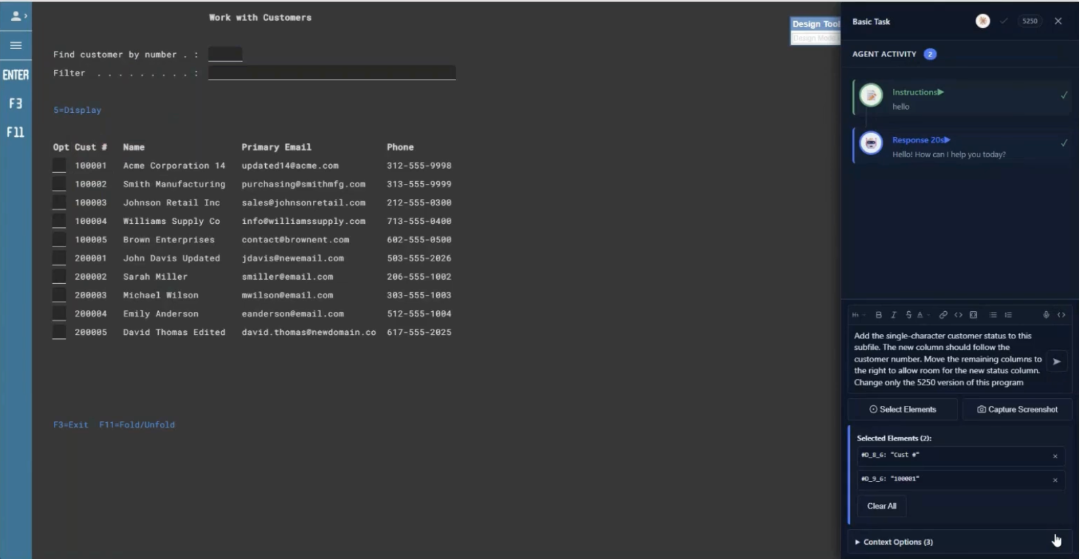
CoderFlow spins up a container, pulls the source repository, and the agent reads the program to understand its structure before making any changes. A few minutes later the task is complete. The status column is in the right position. F11 expand works correctly. The status value accurately reflects the customer’s state when navigating into the detail record.
The task output shows the full account of what the agent did: which library it created on the IBM i, which objects it built, how it tested the result, and what it confirmed before finishing. The git diff of the changed files is available for review line by line. The developer can also open VS Code, which is included in the container build, to inspect the changes directly before approving.
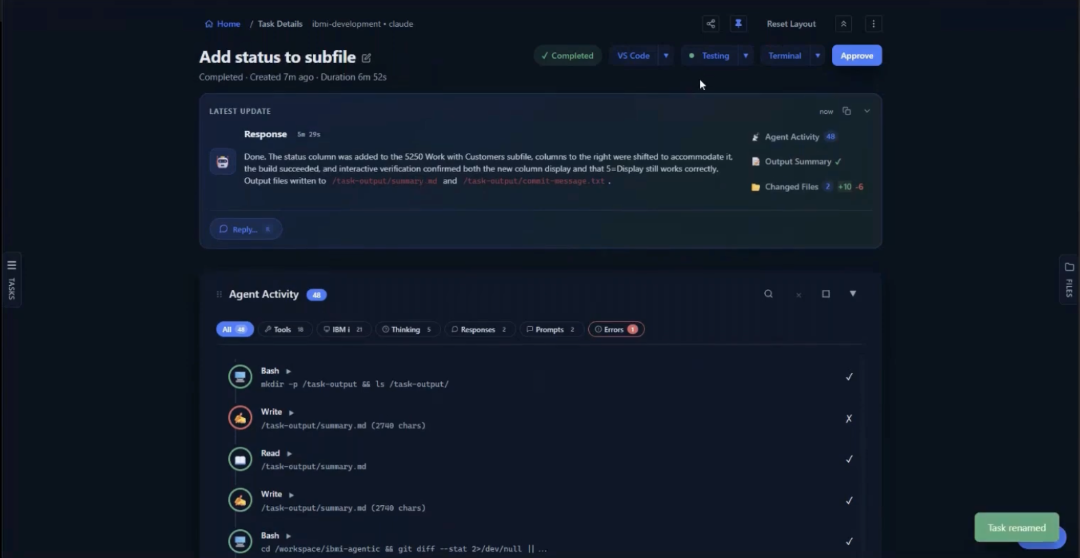
The colleague who made the request gets her answer the same afternoon.
Generating Documentation Without a Separate Initiative
Documentation is the work that is always recognized as valuable and almost never gets done. Not because developers disagree with its importance but because there is always something more pressing. The result is that the knowledge embedded in IBM i applications stays locked in the code and in the heads of whoever wrote it, which becomes a real business continuity problem as those people retire.
CoderFlow handles documentation through templates. A template is a reusable task definition: write the instructions once, specify the variables that change from program to program, and run it as many times as needed against as many programs as you like. The developer selects the source file, chooses one or more models to compare, and launches. No additional instructions are required because the template already contains everything the agent needs, including output locations, formatting standards, and the intended audience for each document type.
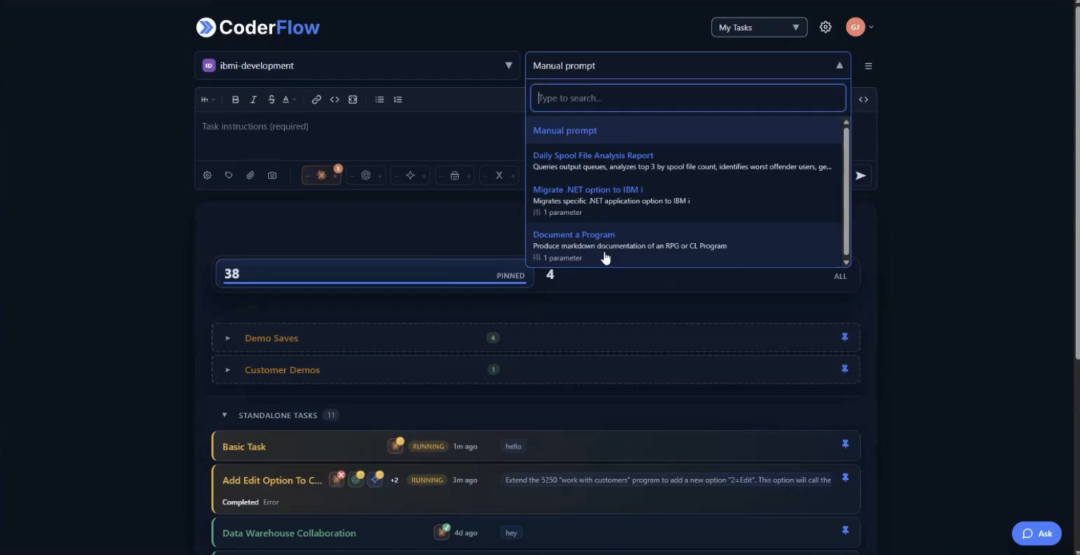
For the work-with-customers program, one template run produced two complete documents. The technical documentation covered the program overview, files used, service program dependencies, a full dependency tree rendered as a flowchart, the database schema, and a program flow walkthrough from startup to exit. The user documentation was written for a new employee being onboarded: how to access the program, what the screen layout shows, available function keys, common task instructions, and how to get help.
Both documents are immediately usable and can be refined. More importantly, the template that produced them can be updated once and then rerun across an entire program library. If the help desk contact changes, one update to the template and one batch run brings every document current. Documentation that was previously a project becomes a task in the same queue as everything else.
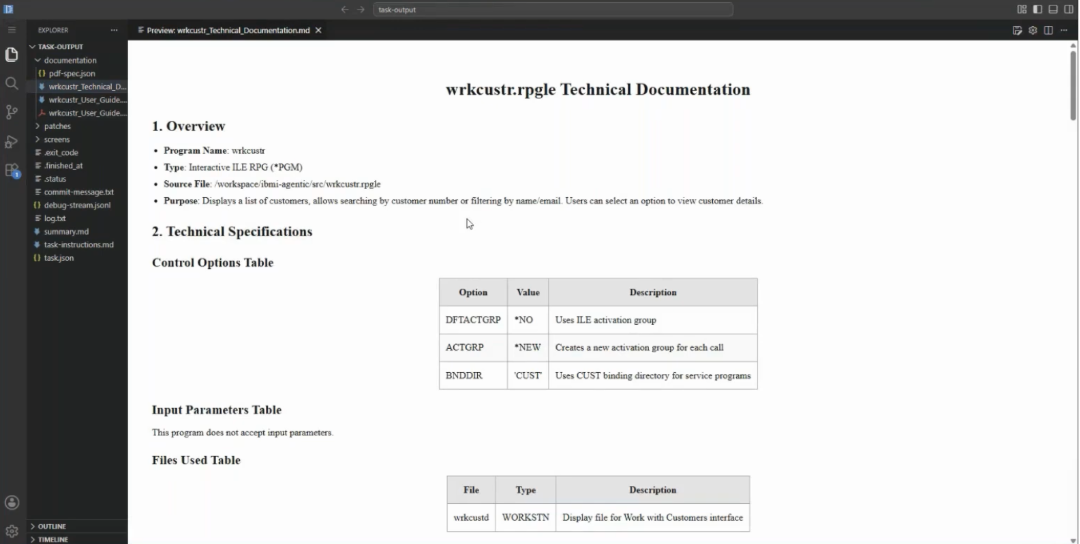
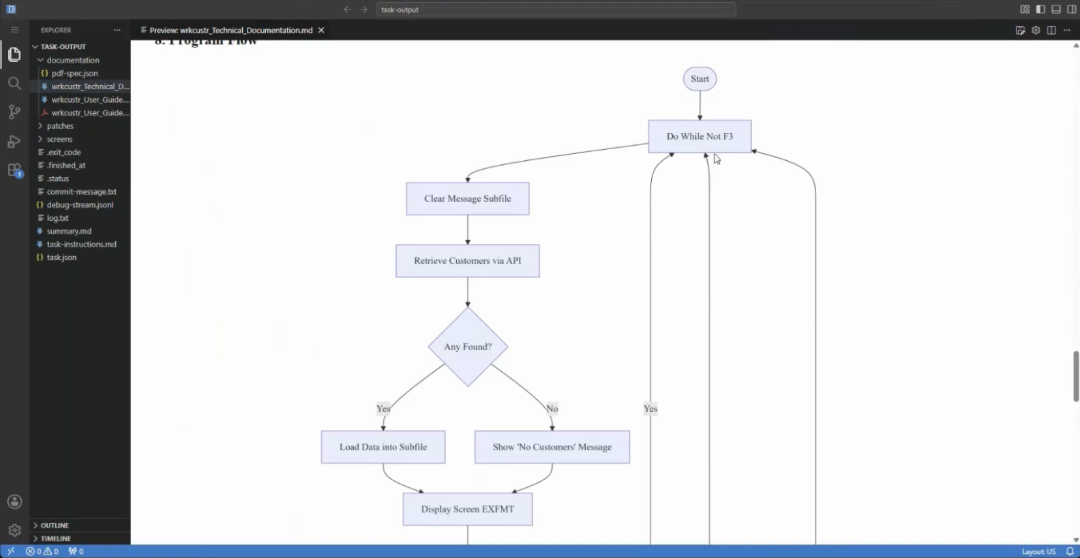
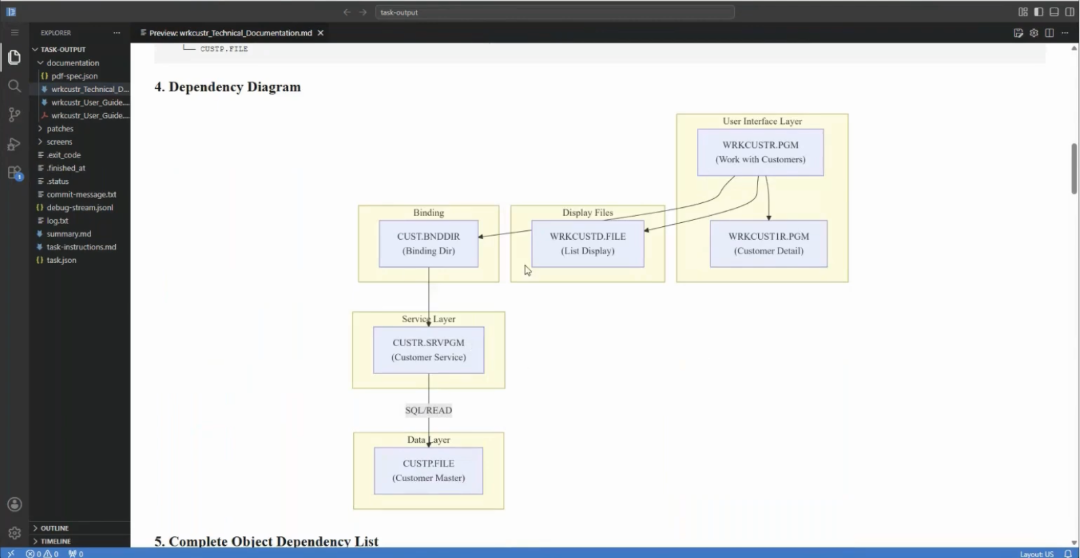
The same template approach applies to integrations with tools like Confluence. A custom Skill built for Confluence lets the agent research a program’s dependencies, build a structured page with a dependency table, and publish it directly to a specified parent in your wiki, all from a single task launch.
What These Three Task Types Have in Common
Each of these tasks looks different on the surface. One is a planned feature addition. One is an unplanned two-minute request. One produces no code at all. But the underlying experience is the same across all three.
The developer describes what they need in plain language. The agent handles the execution, including compilation, testing, and validation. The result that comes back for review is verified, not a draft that still needs to be run. Nothing is committed until the developer approves it, and the full record of what the agent did is visible before that decision is made.
That consistency is what makes agentic coding practical in a production IBM i environment rather than just in a demo. The tasks that fit this model are not exotic. They are the everyday work that developers handle constantly, and they can be handled without the developer being the one to execute them.
Ready to see CoderFlow running against your own IBM i programs? Reach out at Futurization@ProfoundLogic.com or explore CoderFlow at profoundlogic.com/coderflow.